

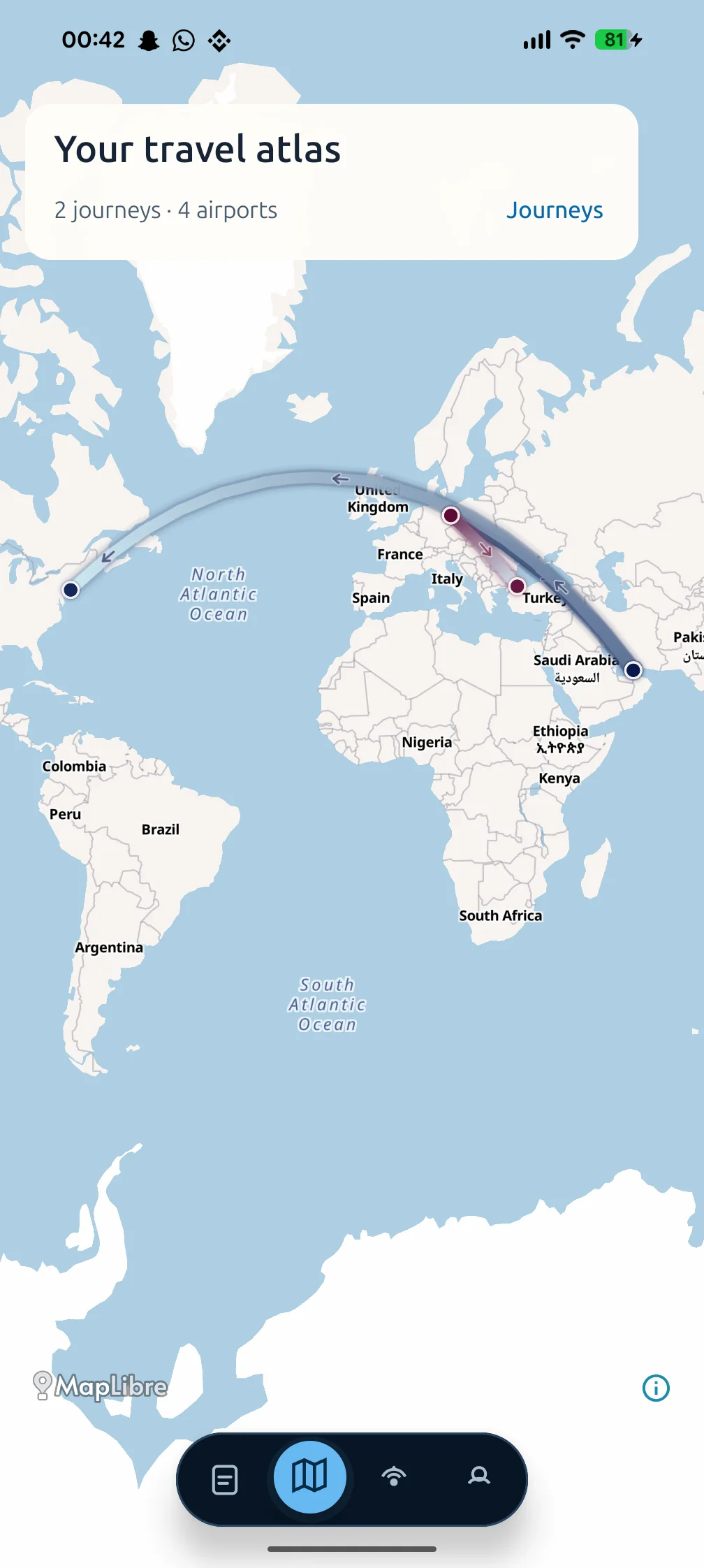
A flight map built from your own history
Your travel atlas starts with the boarding passes you save in AirPassbook. Each recorded flight leg adds a route between airports, giving your travel history a visual shape.
You can explore the overall map or focus on an individual journey. Routes keep their direction and airline identity, so connections remain part of the route you remember.
- Personal flight routes on a world map
- Visited airports from your saved journeys
- Individual journeys and connected flight legs
- A journey list alongside the visual atlas
Understand connections at a glance
A direct flight draws one part of your history. A connecting journey adds the stop along the way. Seeing both on a map can make the path easier to understand than a list of airport codes alone.
For example, a journey from Berlin through Dubai to New York shows two connected legs. The example illustrates how a connection becomes part of the atlas; it is not a recommendation or a current airline schedule.
The map and the diary tell the same story
The flight diary keeps the details together; the atlas shows the geography. Move between them to connect an airport on the map with a journey in your archive.
Your profile also brings together travel statistics such as flights, miles, and your favorite airline. These summaries reflect the history you record in AirPassbook, so an archive with only a few saved trips will show only that part of your travels.
A travel memory map for Android
AirPassbook is available through Google Play. Start with one supported boarding pass and add journeys as you travel. Your archive is tied to your account, and destination discovery is an optional way to explore attractions, events, and food near a selected area.
The atlas is a personal record of saved routes. For current aircraft positions, gate changes, or boarding decisions, use the airline or airport information for your trip.
Read the privacy policy or manage your account and data deletion.